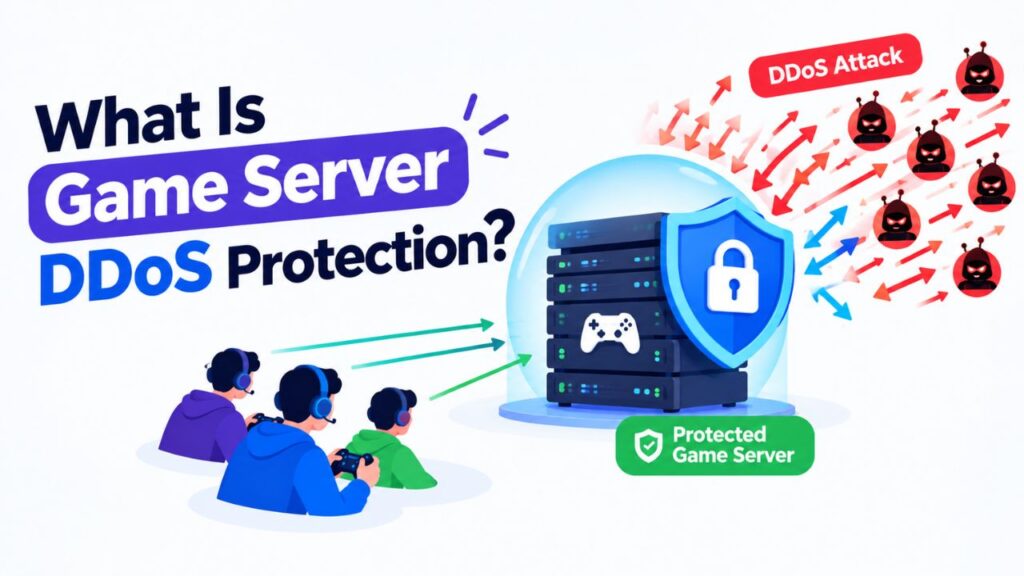
A game server can suddenly become slow, disconnect players, or go offline because of a Distributed Denial of Service (DDoS) attack. The attack sends a large amount of unwanted traffic toward the server or its network.
Game server DDoS protection helps identify and filter this malicious traffic before it can seriously affect legitimate players. It is mainly designed to keep the server reachable and available during an attack.
In this guide, you will learn what game server DDoS protection is, how it works, which attacks can target game servers, and what you should check when choosing DDoS protected hosting.
What Is Game Server DDoS Protection?
Game server DDoS protection is a network security system that detects and mitigates malicious traffic targeting a game server.
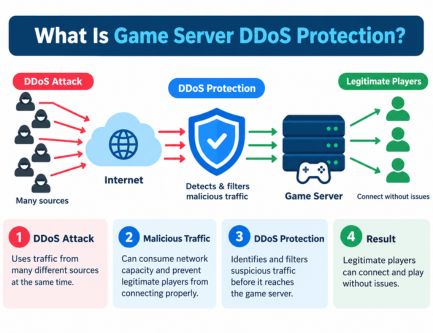
A DDoS attack can involve traffic from many different sources at the same time. When enough unwanted traffic reaches the target, it can consume network capacity and prevent legitimate players from connecting properly.
DDoS protection works by identifying suspicious traffic and filtering or mitigating it before legitimate traffic reaches the game server.
Its main purpose is to:
- Reduce the impact of DDoS attacks
- Keep the game server reachable
- Protect network capacity
- Filter malicious traffic
- Maintain connectivity for legitimate players
- Reduce attack related packet loss and disconnects
DDoS protection does not automatically make your server faster. It is primarily a network availability and security feature.
How Does Game Server DDoS Protection Work?
The basic process looks like this:
Incoming Traffic → Detection → Filtering → Mitigation → Clean Traffic → Game Server
1. Traffic Monitoring
The protection system monitors incoming network traffic and looks for unusual patterns.
It can analyze traffic volume, packet behavior, protocols, connection patterns, and other network characteristics.
2. Attack Detection
When traffic appears abnormal, the mitigation system identifies patterns associated with an attack.
A sudden traffic spike can be a warning sign, but high traffic alone does not always mean the server is under a DDoS attack.
3. Traffic Filtering
Suspicious traffic is filtered according to the provider’s mitigation rules.
The goal is to remove malicious traffic while allowing legitimate player connections to continue.
4. Traffic Mitigation
Large hosting networks may use dedicated mitigation or traffic scrubbing infrastructure.
Instead of allowing all traffic to reach the game server directly, unwanted traffic can be removed before clean traffic is forwarded to the server.
5. Legitimate Traffic Reaches the Server
After mitigation, legitimate traffic is sent toward the game server.
This can help prevent the server’s network connection from becoming overwhelmed during an attack.
The exact protection method varies between hosting providers, so simply seeing “DDoS protected” on a hosting plan does not tell you how strong the protection actually is.
What Types of DDoS Attacks Affect Game Servers?
Different DDoS attacks target different parts of the network or application stack.
| Attack Type | Main Target | Possible Impact |
| Volumetric | Network bandwidth | Congestion and packet loss |
| UDP Flood | UDP traffic | High latency and disconnects |
| TCP/SYN Flood | TCP connections | Connection problems |
| ICMP Flood | Network layer | Network congestion |
| Application Layer | Application services | Service disruption |
Volumetric Attacks
These attacks attempt to consume a large amount of available network capacity.
When network capacity is saturated, legitimate game traffic can experience packet loss, latency, or connection failures.
UDP Floods
UDP floods send large amounts of UDP traffic toward the target.
UDP is important for many real time multiplayer games, although not every game uses UDP in the same way.
For game hosting, checking whether the provider specifically protects UDP traffic is important.
TCP/SYN Floods
These attacks target TCP communication and can place pressure on systems handling connection requests.
The impact depends on the server’s network infrastructure and the mitigation system protecting it.
ICMP Floods
ICMP can also be abused to generate unwanted network traffic.
Large amounts of unwanted ICMP traffic can contribute to congestion and consume network resources.
Application Layer Attacks
Application layer attacks target services at a higher level of the network stack.
The exact risk depends on which game services, control panels, APIs, or other applications are publicly exposed.
L3, L4 and L7 DDoS Attacks
DDoS attacks are commonly categorized by the network layer they target:
| Layer | Name | Common Focus |
| L3 | Network Layer | IP and network traffic |
| L4 | Transport Layer | TCP and UDP traffic |
| L7 | Application Layer | Application-level traffic |
Many game server environments are particularly concerned with L3 and L4 attacks, especially where UDP or TCP traffic is involved.
However, the required protection depends on the game, server software, and publicly exposed services.
How Does DDoS Protection Affect Game Server Performance?
DDoS protection mainly helps protect your server from malicious network traffic. It should not be treated as a general game server performance upgrade.
If your server has high ping because of poor routing, an overloaded CPU, insufficient RAM, packet loss, or a distant server location, DDoS protection will not automatically fix the problem.
DDoS Protection Can Help With:
- Attack related network congestion
- Packet loss caused by malicious traffic
- Unexpected disconnects during an attack
- Network saturation
- Server availability problems
DDoS Protection Does Not Fix:
- Insufficient RAM
- CPU bottlenecks
- Poor server configuration
- Bad network routing
- Normal ISP congestion
- Game engine limitations
- Excessive mods or plugins
High ping alone does not prove a DDoS attack. Network congestion, routing problems, packet loss, and server side performance issues can produce similar symptoms.
How to Choose DDoS Protected Game Hosting
Don’t choose game hosting only because the provider advertises a large DDoS protection number.
Check what the protection actually covers.
| Factor | What to Check |
| Protection Capacity | Available mitigation capacity |
| UDP Support | Whether UDP traffic is protected |
| L3/L4 Coverage | Network and transport layer protection |
| Automatic Mitigation | Whether attacks are handled automatically |
| Network Quality | Routing, latency and packet loss |
| Server Location | Distance from your players |
| Protection Limits | Any traffic or attack restrictions |
| Support | Help during network attacks |
Check DDoS Mitigation Capacity
Providers may advertise protection in Gbps or Tbps.
A higher capacity can be useful, but it is not the only factor that matters. Detection quality, filtering, network architecture, and mitigation infrastructure are equally important.
Check UDP Protection
If your game relies heavily on UDP traffic, confirm that UDP is included in the provider’s DDoS protection.
Don’t assume that every “DDoS protected” hosting plan provides identical UDP protection.
Check L3 and L4 Protection
For many game servers, L3 and L4 protection are especially relevant.
Check whether the provider clearly explains which network layers and protocols are covered.
Look at Network Quality
DDoS protection cannot compensate for a poor network route.
Consider:
- Server location
- Player location
- Network latency
- Packet loss
- Port speed
- Routing quality
- Overall network reliability
Check Protection Limits
Read the provider’s terms before purchasing.
Look for restrictions related to:
- Maximum attack size
- Protected protocols
- Protected services
- Mitigation duration
- Traffic limits
- Additional mitigation charges
A hosting provider can advertise DDoS protection while still applying specific limits.
Consider Support
If your public game server comes under attack, responsive hosting support can make a significant difference.
Check whether the provider has a clear process for reporting attacks and handling network incidents.
FAQs
Does every game server need DDoS protection?
No. Risk depends on the server’s visibility and player base. Public, competitive, and popular game servers generally have more reason to use DDoS protected hosting.
Does DDoS protection reduce game server lag?
Not normally. It mainly protects against attack related network problems. It does not fix CPU, RAM, routing, packet loss, or configuration issues.
Can DDoS protection protect UDP traffic?
Yes, but coverage varies between providers. If your game uses UDP, confirm that UDP traffic is specifically covered by the hosting provider’s protection.
What is L4 DDoS protection?
L4 DDoS protection focuses on the transport layer, including attacks involving protocols such as TCP and UDP.
Is 1 Tbps DDoS protection enough?
There is no universal answer. Protection effectiveness depends on attack size, attack type, detection, filtering, network capacity, and the provider’s mitigation architecture.
Can a VPS have DDoS protection?
Yes. Some VPS providers include DDoS protection, while others offer it as an additional service. Always check exactly what traffic and attack types are covered.
Can DDoS protection completely stop an attack?
No protection system should be treated as an absolute guarantee. Strong infrastructure can significantly reduce the impact of many attacks, but effectiveness depends on the attack and mitigation architecture.
Conclusion
Game server DDoS protection helps keep your server available when malicious traffic attempts to overwhelm its network.
It detects suspicious traffic, filters or mitigates unwanted traffic, and allows legitimate player traffic to reach the server.
When choosing game hosting, don’t focus only on a large Gbps or Tbps number. Check UDP protection, L3/L4 coverage, automatic mitigation, network quality, protection limits, server location, and provider support.
For a public multiplayer server, reliable DDoS protection can be an important part of keeping players connected and reducing attack related downtime.
Pingback: What Is a Game Server Control Panel? Features and Benefits
Pingback: What Is Game Server Uptime?